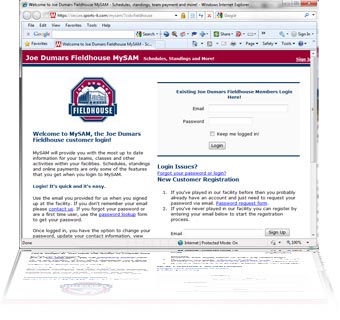
 Thank you for choosing to register online. All online registrations for the Fieldhouse are now handled through a software called MySam. In addition to registration for our sports leagues; MySam manages individual, team, and league statistics. You’ll find links to MySam throughout the Joe Dumars Fieldhouse.
When you click [Continue to Login] below, a new window will open with the login to MySam. If you have used MySam before, you can sign-in on the top right of the screen. If you have not used MySam before, hang in there. We believe you will find it convenient and easy to use once you have had a chance to get to know it.
First Time Players
For first time MySam users: if you are already a member of the Joe Dumars’ Fieldhouse, you probably have an account. If you have not played in a league at the Fieldhouse, you will need to create a new account. Please follow the directions on the right of the MySam login page for New Customers.
Directions to Register for a League
To register for a Sports League, there are several steps to follow. Which set of instructions you follow, will depend on whether you are joining an Open League or a House League.
- Open Leagues - Leagues built of preformed teams that sign up as a group. To register, coaches must first regsiter the team. Coaches can register a team online using our online team registration form or the team form can be
 downloaded and returned by fax or in person. Once coaches have submitted the form, our league administrators will add the team to MySam and players will be able to regsiter and pay online using the same instructions as below.
 - House Leagues - Teams are made up of players who register individually. To register for a house league, follow these simple steps.
team
- Click on Continue to Login below
- Sign In to MySam or follow the instruction to create a new account
- Select "Register" on the left navigation bar
- Select "Join a Team". Coaches: Use the form above to register your team. Do not select Register a Team here.
- Select Teams / House Teams
- Scroll through the options and select "Register" for the course you are interest in joining or the team you have been invited to join
